

I got this error after opening my laptop, I am using Kubuntu
Thanks in advance
UPDATE:
I fixed it by looking in system logs and I realised something was wrong ith the cloned mac address and I fixed it and now it works.
You must log in or register to comment.
Some more info would help:
- You’ve ensured your system is fully up to date?
- Is this after a fresh boot? (Not after the computer has hibernated)
- Is it a fresh Kubuntu install? (Have you done anything on the system yet?)
- Has it worked before on this machine? If so, what were the circumstances?
- What have you tried in order to fix it thus far?
And just to ask the painfully stereotypical tech support question: You’ve tried rebooting it?
- Yes
- The laptop was hibernating
- No
- Yes my internet worked before, I haven’t changed anything since.
- Nothing yet other than rebooting
So the issue started appearing after a hibernation/suspend? Personally I feel like there are so many issues (on all platforms) related to suspending a system instead of shutting it down, and this is an issue I’ve had myself.
Try following this guide: https://www.baeldung.com/linux/wifi-connection-fix-no-reboot
lspci -knnto list kernel modules, and find your wifi module.sudo rmmod [your_wifi_driver]to remove it
sudo modprobe [your_wifi_driver]to load itThe site also shows how to make automation script and stuff too, and alternative solutions.
I hope it’s not too complex, but I can try and help run you through some of it if you need.
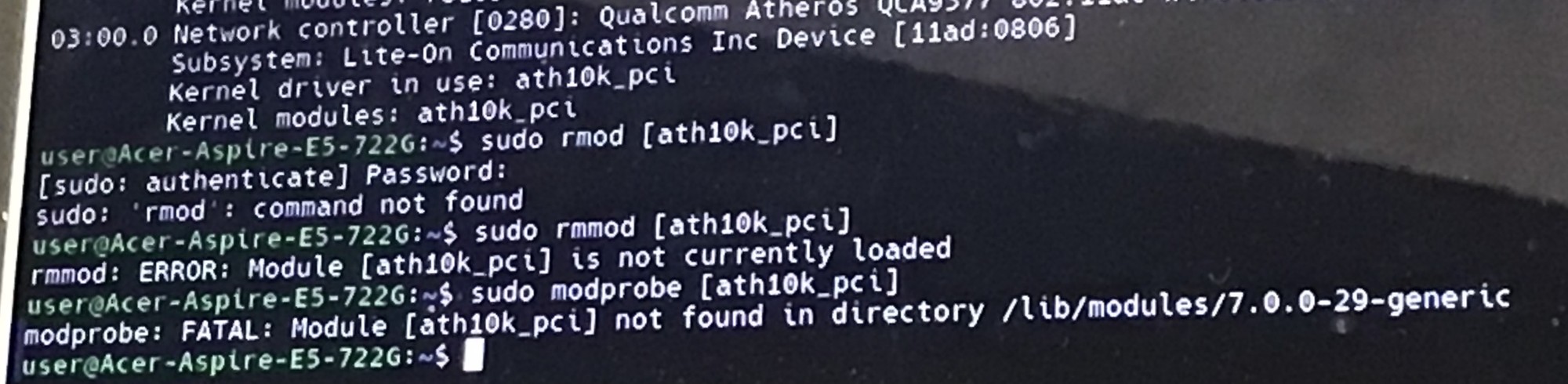 I ran those commands and I got this
Ah, remove the brackets
I did it without the braxkets and it worked but I still get that notification/error
Did any of the other methods in the article work?
Nope, not yet
- Is your concern just that you want to not have the error message, or is something actively broken? As in, do you have internet access despite the error message? If you just hit the “X” to close that message every time it comes up, would you still have other issues aside from having to hit the “X” every time?
- What happens when you click on the “sliders” graphic just left of the “X”? Is there anywhere else on the window that you can click to get more information about the failure?
- Did this only start recently? Was the time you got this error the first time you’d opened your laptop since installing Kubuntu? Is there any other event that might have happened around the same time as this started showing up?
- Does this happen reliably or intermittently? (As in, does it happen every time you open your laptop?) Have you tried reproducing it more than once?
- By “after opening my laptop” you mean that you’d closed the lid without shutting the laptop down and later returned and opened the lid, waking it up from suspend, yes?
- My internet doesn’t work (sorry for not explaining that). If I hit the X it just comes back a few seconds later
- The sliders are just to adjust the notification settings
- This started today, and I have been using Kubuntu for a month or two without this error. I haven’t had any other issues that happened around the same time
- It happens everytime I open my laptop
- Yes, although I have restarted my laptop (shut it down turned it back on) and it still has this error.
Thanks for the help.
Ah! Not just when it comes back from suspend. Also… all other times as well. Heh.
First thing I’d try is to open up the network configuration interface. (My understanding is that there’s a system tray icon for that.) Probably just try checking that everything looks right in the WIFI section of that interface first off. (That the SSID looks right, maybe type your password in again just to make sure it’s right, that kind of thing. Basically as if you’ve never connected to that SSID/access point before and you’re connecting for the first time.) It might be that your WIFI device changed its name recently during an update and the settings you had configured previously are associated with a WIFI device of a different name, so configuring the WIFI device under the new name may do the trick.
If that doesn’t do it, a few more things to try:
- Share the output of
journalctl -b | grep wifi. That might point to a problem. - Share the output of
ip linkandip addr. - Maybe look at the output of
nmcli dev wifijust to make sure the SSID(s) you’re expecting appear as you expect and has decent signal strength. (Of course, if the SSID is hidden, I guess this will be less helpful.)
(The sidebar here says it’s against the rules to share logs and such, so maybe the output of the above commands should be shared via pastebin or some such.)
Nevermind, I got it fixed a different way (see the upddate to the post), thanks for trying to help though.
Great stuff! Glad to hear you’ve got things working.
Might be worthwhile to include whatever additional specifics about the issue you were having and what fix you applied that you can (without doxing yourself or anything like that, of course) if only for the benefit of any random person in the future with the same issue who might run across this thread. Just a thought. ;)
- Share the output of

